Imagine whispering your app idea to a blank screen… and watching it build itself. That’s the experience of no-code app creation with AppForceStudio. This is the no-code app builder you need in your corner.
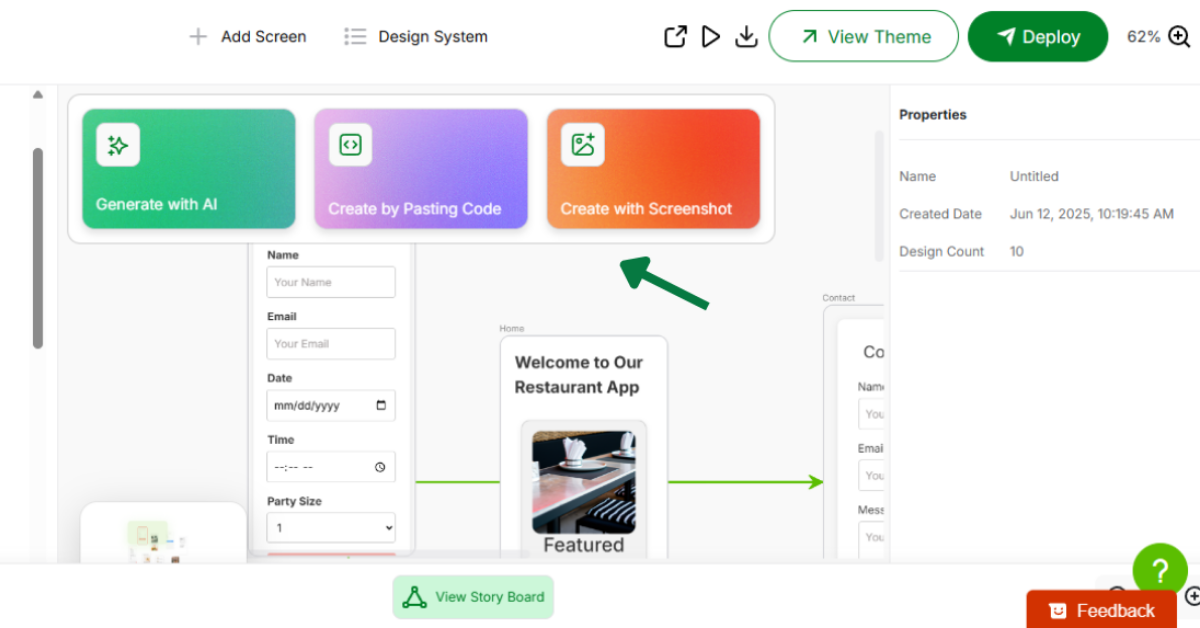
AppForceStudio gives you multiple ways to bring your app ideas to life – whether you’re starting from scratch or building on something that already inspires you.
With powerful AI, flexible workspaces, and easy deployment, you don’t just think it – you build it.
Here is how to utilize the no-code app builder
1. Prompt to App -Just Type What You Imagine with our No-Code app builder

Start by telling AppForceStudio what you want to build in simple words.
Example:
“Create an app that allows tutors to schedule sessions, chat with students, and get paid.”
The system instantly generates a fully functional app structure based on your prompt – with pages, flows, buttons, and layouts.
2. Screenshot to App – Upload an Interface You Like

Saw an app you like and want something similar?
Upload a screenshot of that interface, and AppForceStudio will recreate a layout that mirrors the design while letting you adjust content, colors, and flow to make it your own.
Perfect for designers, visual thinkers, or anyone who knows what they want when they see it.
3. Template to App – Choose, Customize, Go Live

If you’re short on time or unsure where to begin, you can explore a collection of pre-designed templates for various use cases. This has to be one of the top perks of no-code app creation with AppForceStudio.
These templates cover areas such as booking systems, online stores, community apps, portfolio projects, dashboards, tech products, and more. Simply select a template, customize it with your content and branding, and you’ll be ready to go.
4. Code to App – Bring Your Own Logic

If you’ve got a dev background or need more control, AppForceStudio supports code blocks.
You can inject your own features, build dynamic flows, or scale the app beyond templates and AI suggestions.
So whether you’re a no-code beginner or a seasoned builder, there’s a mode that works for you.
5. Build Together in the Playground (Your Workspace)

AppForceStudio apps are hosted within Playgrounds with a collaborative space, allowing teams to:
- Co-edit apps
- Leave comments
- Track changes
- Preview updates in real time
Perfect for building with your co-founder, your dev team, or even a client.
6. Deploy When You’re Ready

Finished your app? Click Deploy and it goes live instantly.
You can share it with testers, your team, or the public. No hosting headaches. No technical setup.
You can also continue to iterate after deployment, updating your app on the fly.
Ready to get started? Sign up for AppForceStudio today!
No code. No limitations. Just creation.