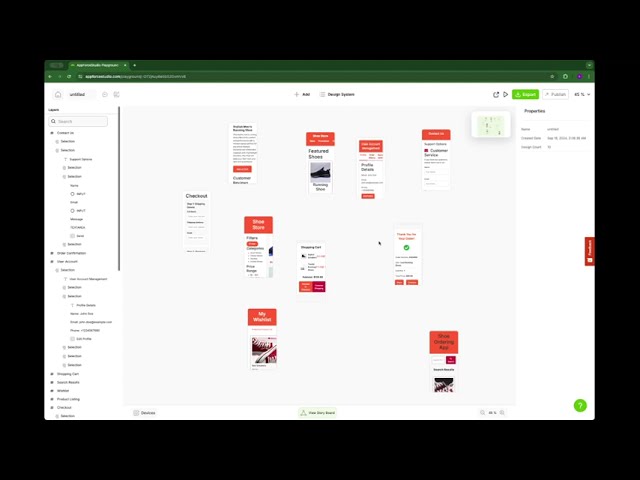
Modern teams face a tough challenge: balancing speed with collaboration. On one hand, deadlines and delivery windows keep shortening. On the other hand, building great products requires input from multiple people — developers, designers, product managers, and even marketers. Without the right system, this often leads to bottlenecks, long handoffs, and endless revisions.
Low-code is changing that. It gives teams a way to work faster without cutting corners. Here’s what no-code and low-code really mean
Why Low-Code Works for Lean Teams
For lean teams, resources are limited — there might only be one or two engineers, and they’re already stretched thin. With low-code platforms:
- Iterations happen faster. Instead of waiting weeks for a prototype, teams can test ideas in days.
- More people can contribute. Product managers or designers can build flows without knowing advanced code.
- Costs go down. Fewer engineering hours are spent on repetitive work. voiding wasted engineering time is key, but so is avoiding common pitfalls. Here are 5 mistakes teams must avoid when building apps with AI.
The result? Teams can stay agile and focus on solving customer problems, not just managing development tasks.
Understanding the benefits is only the first step. The real question is: how do teams actually put low-code into practice so they can build faster and collaborate better? Let’s break it down.
How Low-Code Helps Teams Build Faster and More Collaboratively
Modern teams are under pressure: timelines keep tightening, projects demand cross-functional input, and resources are rarely unlimited. The result? Bottlenecks, long handoffs, and slow launches.
Low-code changes that. It gives lean teams the ability to move faster, collaborate seamlessly, and keep quality high — without relying solely on scarce engineering resources. Here’s how to make it work for your team.
1. Set Up a Shared Low-Code Platform
The first step is creating one central workspace where everyone can contribute. A low-code platform lets developers, designers, and product managers work in the same environment. This eliminates handoffs and ensures visibility across the team.
Tip: Make sure your platform supports real-time collaboration so changes happen instantly and transparently.
2. Define Roles and Permissions Early
Collaboration doesn’t mean chaos. To move quickly while staying in control, assign roles from the start. Give designers edit rights for UI screens, limit sensitive data access to developers, and keep managers in approval roles.
Result: The right people can act fast without stepping on each other’s toes.
3. Use Collaborative Features to Speed Up Reviews
Low-code tools make reviews painless. Instead of waiting for builds or screenshots, stakeholders can view and edit live prototypes. Feedback is captured in one place, so there’s no chasing email threads or Slack messages.
Best Practice: Schedule short review cycles (daily or weekly) so teams iterate continuously instead of waiting for a “big reveal.”
Step 4: Track Workflows and Version History
Agility doesn’t mean losing track. The best collaborative app tools include workflow management and version control. That means:
- Approvals are documented
- Changes are tracked
- Previous versions can always be restored
This builds confidence that speed won’t come at the cost of quality.
Step 5: Prototype Together, Launch Faster
Finally, bring the whole team into prototyping. Product managers can sketch flows, designers can shape screens, and developers can fine-tune logic, all in one place. By the time you’re ready to launch, you’ve already tested ideas collaboratively and reduced rework.
Outcome: Teams ship weeks or months faster than traditional cycles allow.
These steps create the foundation for speed and alignment. But collaboration isn’t just about processes; it’s also about how teams communicate and work inside the same space. That’s where low-code platforms take things even further.
Collaboration at the Core
Speed alone isn’t enough. Teams also need to stay aligned:
- Real-time collaboration means multiple people can work on the same app or feature without stepping on each other’s toes.
- Transparency comes when everyone can see progress in one shared space.
- Clear responsibilities prevent rework and confusion about who owns what.
These habits don’t just save time; they create a culture where ideas flow freely and projects move forward without friction.
True collaboration isn’t just about speed; it’s about clarity. Here’s what you actually need to build an app versus what most teams assume.
Managing Permissions and Workflows
A common fear with collaboration is losing control. That’s where permissions and workflows matter:
- Role-based access ensures the right people have the right level of control.
- Approval flows help prevent mistakes before they reach production.
- Version tracking means nothing is ever “lost.”
With structure in place, teams can work quickly while still maintaining quality and accountability.
How Teams Put It Into Practice
Successful teams already use low-code to:
- Ship MVPs faster and validate ideas early
- Enable non-technical staff to take ownership of small features
- Collaborate across time zones without constant handoffs
- Reduce dependencies on single developers or departments
The common thread? Low-code makes building a shared responsibility instead of a siloed task.
Teams have many options when choosing collaborative tools. Our AI App Builder Buyer’s Guide shows what to look for and how to pick the right fit.
Where AppForce Studio Fits In
If your team is ready to put this into practice and is looking for a platform that combines these benefits, use AppForceStudio to bring it all together.
AppForce Studio (AFS) is a team app builder designed for exactly this kind of collaboration. With AFS, you can:
- Work in real time across roles and time zones
- Manage roles, permissions, and approvals with ease
- Prototype and launch apps in weeks instead of months
In other words: AFS turns the promise of low-code collaboration into reality.
The real power of low-code is that it puts building back into the hands of the whole team. Ideas move faster, collaboration gets simpler, and results come sooner. AppForce Studio was built with that exact vision: to help lean teams do more with less, together.
What’s Next for Your Team?
If your team has ever felt the drag of long timelines, heavy handoffs, or bottlenecks, low-code is one of the simplest ways to break free. Start small: prototype a feature, invite your teammates in, and see how quickly you can move when collaboration is built into the process.
With the right collaborative app tools, your team can shift from waiting to building — and from working in silos to creating together.
That’s exactly why AppForceStudio exists: to give lean teams a team app builder designed for speed, collaboration, and control. The future of building is already here, and it starts with your next project.
Want to explore even more possibilities? Check out the best free AI app builders to see how far your team can go.