


Introduction: Why App Storyboarding Matters
Every successful app starts with a story.
Think of your favourite apps, from Instagram to Uber. Behind every tap, swipe, and scroll is a carefully designed journey. The user flow — how someone goes from “open app” to “achieve goal” — makes or breaks the experience.
Traditionally, mapping this flow required wireframes, mockups, and developer handoffs. Founders often spent weeks sketching on whiteboards or using tools like Figma, only to face delays when developers struggled to translate designs into working screens.
But what if you could map your app’s story visually — and instantly bring it to life as a prototype or even a deployable app?
That’s exactly what AppForceStudio’s Storyboarding feature does.
With AFS Storyboarding, you can:
- Map user flows with drag-and-drop clarity.
- Define navigation between screens.
- Instantly preview and test your app experience.
- Go from idea → storyboard → working app in days, not months.
This is the next era of app design: where storyboards aren’t just static diagrams, but the foundation of live, working applications.
What Is Storyboarding in AppForceStudio?
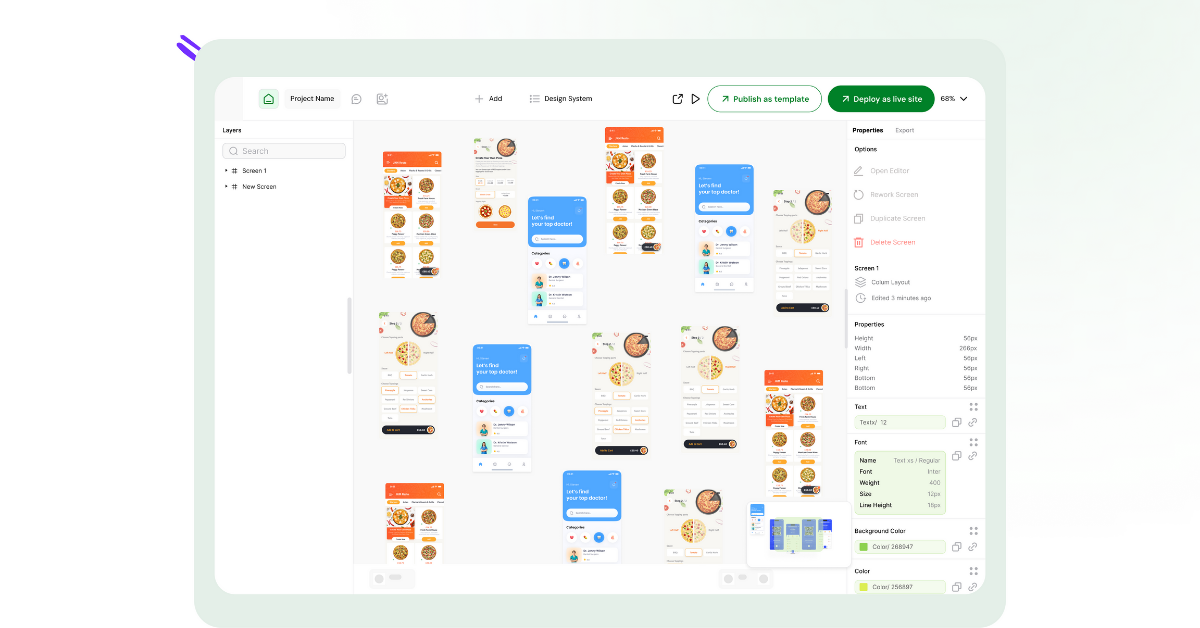
Storyboarding in AppForceStudio is the visual mapping tool that connects your app screens and defines how users will interact with them.
Instead of just drawing arrows in Figma or Miro, you actually map navigation logic inside AFS.
- Want the “Login” button to lead to a “Home” screen? → Connect them.
- Need the “Checkout” button to trigger a “Payment” flow? → Drag the navigation line.
- Testing different onboarding paths? → Branch your storyboard in seconds.
The result is a visual blueprint of your app’s user journey, complete with functional navigation that can be previewed immediately.
Unlike traditional design tools, AFS storyboards aren’t abstract. They’re live prototypes, meaning you can click through flows just like a real user.
Why Storyboarding Is a Game-Changer
Here’s why AppForceStudio’s Storyboarding feature is a major leap forward compared to traditional app planning:
1. No More “Lost in Translation” Between Design and Code
Normally, storyboards are static. Developers have to interpret them into working navigation, often leading to miscommunication.
With AFS, the storyboard itself is the app flow. No handoff needed.
2. Prototype in Minutes, Not Weeks
In traditional development, storyboards are followed by wireframes → mockups → clickable prototypes → developer builds.
With AFS, you skip those layers. Storyboards instantly become clickable prototypes, ready for user testing.
3. Iterate Instantly
Got feedback from a test user? Adjusting flows is as easy as dragging a new line. No need to wait for a developer sprint.
4. Built for Teams
Collaboration is built in. Teams can comment, share, and adjust flows in real time. Like Figma (even better), but for actual apps.
5. Competitive Edge
Competitors like Replit, Bolt, and Cursor don’t offer storyboard features. AFS is the only platform that combines AI-powered app generation with a built-in storyboard tool.
How Storyboarding Works in AppForceStudio
Let’s walk through the step-by-step process.
Step 1: Start With Screens
You can create app screens in multiple ways with AFS:
- AI Prompting – Describe your app in plain English, and AFS generates screens.
- Design to Screenshot – Upload a Figma or Canva export, and AFS turns it into a functional UI.
- Paste Code – Drop in HTML, SwiftUI, or Kotlin code to generate screens.
Step 2: Open Storyboarding Mode
Inside the Canvas, you’ll see your screens laid out visually. Switch to Storyboarding mode, where you can map interactions.
Step 3: Connect Navigation Flows
Click a button, drag a green line to another screen, and define the navigation action. For example:
- “Login” → “Home Screen”
- “Add to Cart” → “Checkout Screen”
- “Skip Intro” → “Dashboard”
Step 4: Prototype Instantly
Once your storyboard is mapped, you can preview the app immediately. Test flows, check for dead ends, and ensure smooth user journeys.
Step 5: Iterate & Collaborate
Share your storyboard with teammates. Add comments, adjust flows, and keep evolving the experience.
Step 6: Deploy When Ready
When your storyboard feels right, you can go from prototype → full app in one click. AFS exports code for iOS, Android, or Web. You can also deploy as a website to see and test.
Use Cases: Who Benefits From Storyboarding?
1. Startup Founders
Need to pitch investors? Storyboarding lets you show a working prototype in days instead of pitching slides.
2. Designers
Designers can bring their UI to life without needing developers. AFS respects your design integrity while making it interactive.
3. Developers
Developers save time by skipping redundant setup. Storyboards map flows visually while keeping full code export available.
4. Small Businesses
Want an app for bookings, loyalty programs, or e-commerce? Storyboarding gives you a fast, affordable way to build customer journeys.
5. Educators & Students
Storyboarding is a powerful teaching tool. Students can learn app UX principles by mapping real flows, not just sketching.
6. Freelancers & Agencies
Freelancers can impress clients with rapid prototypes and then instantly deliver working apps.
Storyboarding vs. Traditional App Planning
| Feature | Traditional Planning | AppForceStudio Storyboarding |
| Navigation Mapping | Static wireframes | Live, functional flows |
| Prototyping | Weeks of design/dev cycles | Instant preview |
| Handoff | Multiple tools & delays | No handoff, all-in-one |
| Iteration | Slow, developer-heavy | Instant drag-and-drop |
| Collaboration | External tools needed | Built-in comments & sharing |
| Launch | Needs developers | One-click deploy |
AFS wins by collapsing weeks of workflow into minutes.
Real-World Example: From Idea to App in 7 Days
Imagine you’re building a food delivery startup app.
- Day 1: Use AI prompts to generate screens: “Customer login, browse restaurants, add to cart, checkout.”
- Day 2: Open Storyboarding. Connect flows: Login → Browse → Checkout → Payment Success.
- Day 3: Preview flows, run a quick user test with friends.
- Day 4: Adjust based on feedback (e.g., add a “Favourites” flow).
- Day 5: Collaborate with co-founder on UI tweaks.
- Day 6: Deploy as a live site for immediate testing & export code for iOS and Android.
- Day 7: Launch MVP to the app store.
What would have taken 3–6 months with traditional development now takes a single week.
💡 Want to try it yourself? Open AppForceStudio today and start mapping your first storyboard.
No credit card needed.
Conclusion: Don’t Just Sketch Your App. Build It.
Storyboarding has always been a part of app creation. But until now, it’s been separate from development. It has been a planning step, not an execution step.
With AppForceStudio, storyboards aren’t just pictures on a whiteboard. They’re the blueprint, prototype, and launchpad for your app.
Whether you’re a founder, freelancer, or student, AFS Storyboarding lets you:
- Visualise flows clearly.
- Prototype instantly.
- Launch apps faster than ever.
Your app could be live this week. Try storyboarding with AppForceStudio today.


One thought on “AppForceStudio Storyboarding: The Fastest Way to Design & Launch Apps Without Guesswork”